foolcontrol3.6.5
Publisher Description


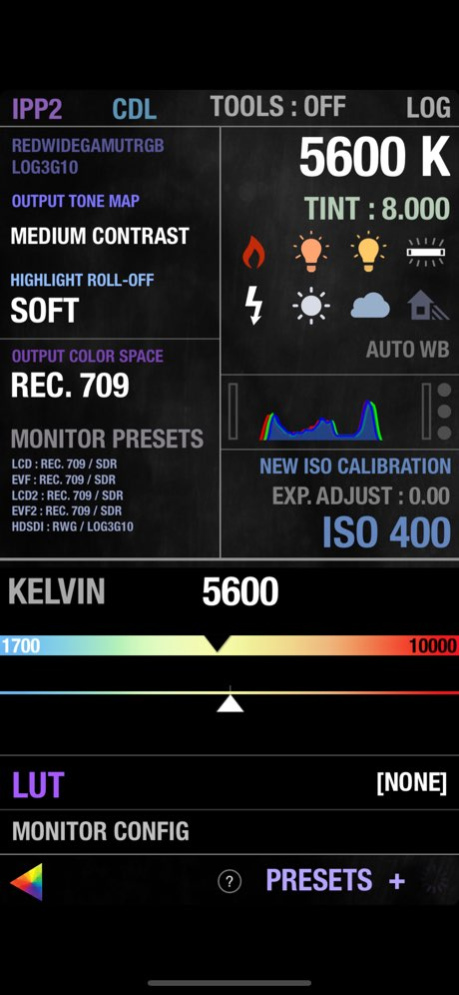
foolcontrol lets you get full control over a RED DIGITAL CINEMA DSMC(TM) camera connected to the same network as your iOS device, WEAPON, EPIC-W, SCARLET-W and RAVEN all have built in WiFi while EPIC / SCARLET cameras require additional wireless accessories to work with foolcontrol (see below).
- PREVIEW : recording state, format, project / sensor frame rate, timecode, pre-record, frame trigger frame tagging, OLPF, REDcode, lookaround, shutter angle / speed, histogram, goal posts, traffic lights, gamma / color space, recording mode, frame processing, HDRx, Motion Mount, iris vale, white balance, tint, ISO, tools, RAW view, magnify, production info, scene and take metadata, VU meter, battery level / time left, media remaining / recording time, clip count, clip name, previous clip info. Indicators for : LAN, ext. timecode, sync, genlock, RIG, errors, camera fan speed and temperature. Eject media, power saving modes and shutdown the camera.
- FOCUS : Circular focus disc with advanced features : colored users marks, smooth bezier rack focus with adjustable speed, add hard stop for near/far focus, select 1,2,3,4,5 or 10 knob turns for super precise focusing without loosing any previous marks, searchable preset focus discs markers, create, recall, sort, rename and export your own user focus distance discs : unique mode lets you add repeatable distance marks for your lenses. AF mode selection, autofocus trigger, AF zone size and center, rack focus mode points recall, iris, magnify, record start stop, audible marks and more.
- LOOK : set camera look using a multi speed slider or manual value input : contrast, exposure, saturation, shadow, brightness, RGB gains, kelvin, tint and FLUT. Color temperature presets, auto white balance, ISO, color / gamma space.
- CURVES : Shape luma, red, green and blue curves to create in-camera grades. Drag curves points using 3 different modes for normal, fine, and super fine curve adjustment.
- PLAYBACK : list all the clips on your media with timecode, thumbnail and duration. Play forward, backward, frame by frame, go to end and beginning, set in/out points, navigate marked frame, set playback speed and looping mode.
- KEYS : navigate your camera menu using knob, buttons or gesture pad. Access to all buttons and menu pages.
- PRESETS : create and apply camera presets. A preset can include one or several parameters from look, curves, camera settings, slate and many more. Presets can be sorted, renamed and exported by email.
- SLATE : quickly set metadata values for production, director, DOP, scene, shot, take, project info, camera operator, unit and location. GPS location (on GPS enabled devices). Set timecode mode and value.
- CAMERA MENU tree
- RECORD SETTINGS with access to advanced record formats, mode and options.
- LINEAR FOCUS for single operators
-------------
To use an EPIC or SCARLET camera with foolcontrol on the same wifi network you will need to use one of these :
- RED lemo to cat5 ethernet cable and a GIG-E wireless router.
- RED REDLink bridge wifi module.
- Teradek COLR and GIG-E to lemo cable.
- RTMotion latitude
WEAPON / EPIC-W / SCARLET-W and RAVEN have built in wifi ready for foolcontrol. Wooden camera has an antenna replacement accessory called the 'Wifi Side Plate' to increase camera wifi range.
It is always recommended to use a router on set (infrastructure mode) instead of the Ad Hoc network setup in camera.
IG : @foolmika
Please note :
This application will not work with the RED ONE or any other camera. Focus control requires a RED Canon or Nikon mount and a compatible electronic lens.
Version History Support for iPhone Duo 3.6.5 1d ago Fixed an issue with GEMINI Low Light calibration files (creating or deleting them).
Fixed a rare issue with camera notifications locking or crashing the app 3.50 04/14/2022 sharing presets bug fix. 3.49 09/13/2020 bug fix : entering playback mode would not switch to corresponding page in the app 3.48 05/21/2020 fix for camera notification messages delay.
Additional detail on preset descriptions when containing a LUT.
Cosmetic fix for Monitor Priority re-order list. 3.45 05/11/2020 New 'offline preset mode' lets you export your foolcontrol presets by email without being connected to a camera. 3.42 05/08/2020 - bug fix for iOS 9.3 support 3.39 05/06/2020 fix for circular focus wheel that was disabled with 3.37 update. 3.38 04/17/2020 fix for remote connection with manual iP address 3.37 04/08/2020 - Support for upside down screen mode
- Added per frame GPS metadata ingest feature
- Bug fix for some DSMC1 cameras wrongly identified as monochrome 3.28 04/30/2019 bug fix and better support for camera FW 7.2 3.26 02/12/2019 added optional tick sound on button click, fix to power voltage display and support for latest tools and camera FW 3.25 02/01/2019 stalling bug fix on ADVANCED REC SETTINGS page 3.01 05/16/2018 initial GEMINI sensor support
various bug fixes 3.0 04/11/2018 support for camera firmware 7.01 2.97 12/20/2017 bug fixes (menu tree re-activation, playback with only 1 clip on card, MONSTRO iSO cal 2 support). 2.95 12/08/2017 bug fix for key assign on iOS 11
pre-record display bug fix
shutter speed mode when saving preset bug fix 2.94 10/06/2017 - GIO scopes zones bug fix.
- fixed 'action' menu items button size 2.92 09/23/2017 camera discovery optimization 2.86 07/25/2017 - fixed a remaining issue on sub page loading. Thanks Thai Christen ! 2.78 06/14/2017 - bug fix on REC SETTINGS button. 2.75 06/12/2017 new : camera ID letter and color on home page.
new : KipperTie OLPF metadata ingest
UI optimisation, IPP2 support and small bug fixes 2.71 05/26/2017 2.51 :
bug fixes in iPad UI, Watch App and Motion Mount detection
2.50 :
- IPP2 support for Helium ToneMap, Highlight, CDL, monitoring setup and simulated LGG.
- Key Mapping support, SoftKeys pop up
- New preset options, for CDL, IPP2, KeyMap, Record settings, Monitoring...
- BlackShading creation via app
- LUT support
- Pixel size display
- New LightPoints pop up for color correction 2.51 04/19/2017 - IPP2 full support for Helium, including ToneMap, Highlight, CDL, monitoring setup and simulated LGG.
- complete Key Mapping support, SoftKeys pop up
- New preset options, for CDL, IPP2, KeyMap, Record settings, Monitoring...
- BlackShading creation via app
- LUT support
- pixel size display
- New LightPoints pop up for color correction
- small bug fixes and numerous improvements 2.50 04/14/2017 - bug fix for upcoming camera firmware update
- initial support for IPP2 2.16 02/24/2017
About foolcontrol
The company that develops foolcontrol is FOOLCOLOR. The latest version released by its developer is 3.6.5. This app was rated by 4 users of our site and has an average rating of 4.8.
To install foolcontrol on your iOS device, just click the green Continue To App button above to start the installation process. The app is listed on our website since 2026-10-15 and was downloaded 216 times. We have already checked if the download link is safe, however for your own protection we recommend that you scan the downloaded app with your antivirus. Your antivirus may detect the foolcontrol as malware if the download link is broken.
How to install foolcontrol on your iOS device:
- Click on the Continue To App button on our website. This will redirect you to the App Store.
- Once the foolcontrol is shown in the iTunes listing of your iOS device, you can start its download and installation. Tap on the GET button to the right of the app to start downloading it.
- If you are not logged-in the iOS appstore app, you'll be prompted for your your Apple ID and/or password.
- After foolcontrol is downloaded, you'll see an INSTALL button to the right. Tap on it to start the actual installation of the iOS app.
- Once installation is finished you can tap on the OPEN button to start it. Its icon will also be added to your device home screen.
Program Details
System requirements
Download information
Pricing
Version History
version 3.6.5
posted on 2026-10-15
Version History Support for iPhone Duo 3.6.5 1d ago Fixed an issue with GEMINI Low Light calibration files (creating or deleting them).
Fixed a rare issue with camera notifications locking or crashing the app 3.50 04/14/2022 sharing presets bug fix. 3.49 09/13/2020 bug fix : entering playback mode would not switch to corresponding page in the app 3.48 05/21/2020 fix for camera notification messages delay.
Additional detail on preset descriptions when containing a LUT.
Cosmetic fix for Monitor Priority re-order list. 3.45 05/11/2020 New 'offline preset mode' lets you export your foolcontrol presets by email without being connected to a camera. 3.42 05/08/2020 - bug fix for iOS 9.3 support 3.39 05/06/2020 fix for circular focus wheel that was disabled with 3.37 update. 3.38 04/17/2020 fix for remote connection with manual iP address 3.37 04/08/2020 - Support for upside down screen mode
- Added per frame GPS metadata ingest feature
- Bug fix for some DSMC1 cameras wrongly identified as monochrome 3.28 04/30/2019 bug fix and better support for camera FW 7.2 3.26 02/12/2019 added optional tick sound on button click, fix to power voltage display and support for latest tools and camera FW 3.25 02/01/2019 stalling bug fix on ADVANCED REC SETTINGS page 3.01 05/16/2018 initial GEMINI sensor support
various bug fixes 3.0 04/11/2018 support for camera firmware 7.01 2.97 12/20/2017 bug fixes (menu tree re-activation, playback with only 1 clip on card, MONSTRO iSO cal 2 support). 2.95 12/08/2017 bug fix for key assign on iOS 11
pre-record display bug fix
shutter speed mode when saving preset bug fix 2.94 10/06/2017 - GIO scopes zones bug fix.
- fixed 'action' menu items button size 2.92 09/23/2017 camera discovery optimization 2.86 07/25/2017 - fixed a remaining issue on sub page loading. Thanks Thai Christen ! 2.78 06/14/2017 - bug fix on REC SETTINGS button. 2.75 06/12/2017 new : camera ID letter and color on home page.
new : KipperTie OLPF metadata ingest
UI optimisation, IPP2 support and small bug fixes 2.71 05/26/2017 2.51 :
bug fixes in iPad UI, Watch App and Motion Mount detection
2.50 :
- IPP2 support for Helium ToneMap, Highlight, CDL, monitoring setup and simulated LGG.
- Key Mapping support, SoftKeys pop up
- New preset options, for CDL, IPP2, KeyMap, Record settings, Monitoring...
- BlackShading creation via app
- LUT support
- Pixel size display
- New LightPoints pop up for color correction 2.51 04/19/2017 - IPP2 full support for Helium, including ToneMap, Highlight, CDL, monitoring setup and simulated LGG.
- complete Key Mapping support, SoftKeys pop up
- New preset options, for CDL, IPP2, KeyMap, Record settings, Monitoring...
- BlackShading creation via app
- LUT support
- pixel size display
- New LightPoints pop up for color correction
- small bug fixes and numerous improvements 2.50 04/14/2017 - bug fix for upcoming camera firmware update
- initial support for IPP2 2.16 02/24/2017
version 3.50
posted on 2026-10-08
Version History Fixed an issue with GEMINI Low Light calibration files (creating or deleting them).
Fixed a rare issue with camera notifications locking or crashing the app 3.50 04/14/2022 sharing presets bug fix. 3.49 09/13/2020 bug fix : entering playback mode would not switch to corresponding page in the app 3.48 05/21/2020 fix for camera notification messages delay.
Additional detail on preset descriptions when containing a LUT.
Cosmetic fix for Monitor Priority re-order list. 3.45 05/11/2020 New 'offline preset mode' lets you export your foolcontrol presets by email without being connected to a camera. 3.42 05/08/2020 - bug fix for iOS 9.3 support 3.39 05/06/2020 fix for circular focus wheel that was disabled with 3.37 update. 3.38 04/17/2020 fix for remote connection with manual iP address 3.37 04/08/2020 - Support for upside down screen mode
- Added per frame GPS metadata ingest feature
- Bug fix for some DSMC1 cameras wrongly identified as monochrome 3.28 04/30/2019 bug fix and better support for camera FW 7.2 3.26 02/12/2019 added optional tick sound on button click, fix to power voltage display and support for latest tools and camera FW 3.25 02/01/2019 stalling bug fix on ADVANCED REC SETTINGS page 3.01 05/16/2018 initial GEMINI sensor support
various bug fixes 3.0 04/11/2018 support for camera firmware 7.01 2.97 12/20/2017 bug fixes (menu tree re-activation, playback with only 1 clip on card, MONSTRO iSO cal 2 support). 2.95 12/08/2017 bug fix for key assign on iOS 11
pre-record display bug fix
shutter speed mode when saving preset bug fix 2.94 10/06/2017 - GIO scopes zones bug fix.
- fixed 'action' menu items button size 2.92 09/23/2017 camera discovery optimization 2.86 07/25/2017 - fixed a remaining issue on sub page loading. Thanks Thai Christen ! 2.78 06/14/2017 - bug fix on REC SETTINGS button. 2.75 06/12/2017 new : camera ID letter and color on home page.
new : KipperTie OLPF metadata ingest
UI optimisation, IPP2 support and small bug fixes 2.71 05/26/2017 2.51 :
bug fixes in iPad UI, Watch App and Motion Mount detection
2.50 :
- IPP2 support for Helium ToneMap, Highlight, CDL, monitoring setup and simulated LGG.
- Key Mapping support, SoftKeys pop up
- New preset options, for CDL, IPP2, KeyMap, Record settings, Monitoring...
- BlackShading creation via app
- LUT support
- Pixel size display
- New LightPoints pop up for color correction 2.51 04/19/2017 - IPP2 full support for Helium, including ToneMap, Highlight, CDL, monitoring setup and simulated LGG.
- complete Key Mapping support, SoftKeys pop up
- New preset options, for CDL, IPP2, KeyMap, Record settings, Monitoring...
- BlackShading creation via app
- LUT support
- pixel size display
- New LightPoints pop up for color correction
- small bug fixes and numerous improvements 2.50 04/14/2017 - bug fix for upcoming camera firmware update
- initial support for IPP2 2.16 02/24/2017 stronger camera discovery process, extended ISO range access, RWGRGB initial support, new shortcuts on main page, camera menu display fixes, preset page optimisations, mounted lens id 2.15 02/15/2017
version 3.50
posted on 2022-04-14
Apr 14, 2022
Version 3.50
Fixed an issue with GEMINI Low Light calibration files (creating or deleting them).
Fixed a rare issue with camera notifications locking or crashing the app
version 3.50
posted on 2022-04-14
Fixed an issue with GEMINI Low Light calibration files (creating or deleting them).
Fixed a rare issue with camera notifications locking or crashing the app
